
When your website or application outgrows shared hosting, moving to a Virtual Private Server (VPS) is often the next step. But as websites and applications become more demanding, the way that VPS is built becomes increasingly important.
A traditional VPS gives you dedicated resources and more control over your hosting environment. However, it is still tied to a physical server, which can make it harder to add resources or deal with hardware problems as your needs grow.
For developers, SaaS businesses, eCommerce platforms, and growing companies, this can affect how easily you can increase your server resources, how your website handles hardware problems, and how consistently your applications stay online.
This is where Cloud VPS can provide a significant advantage.
What is a Traditional VPS?
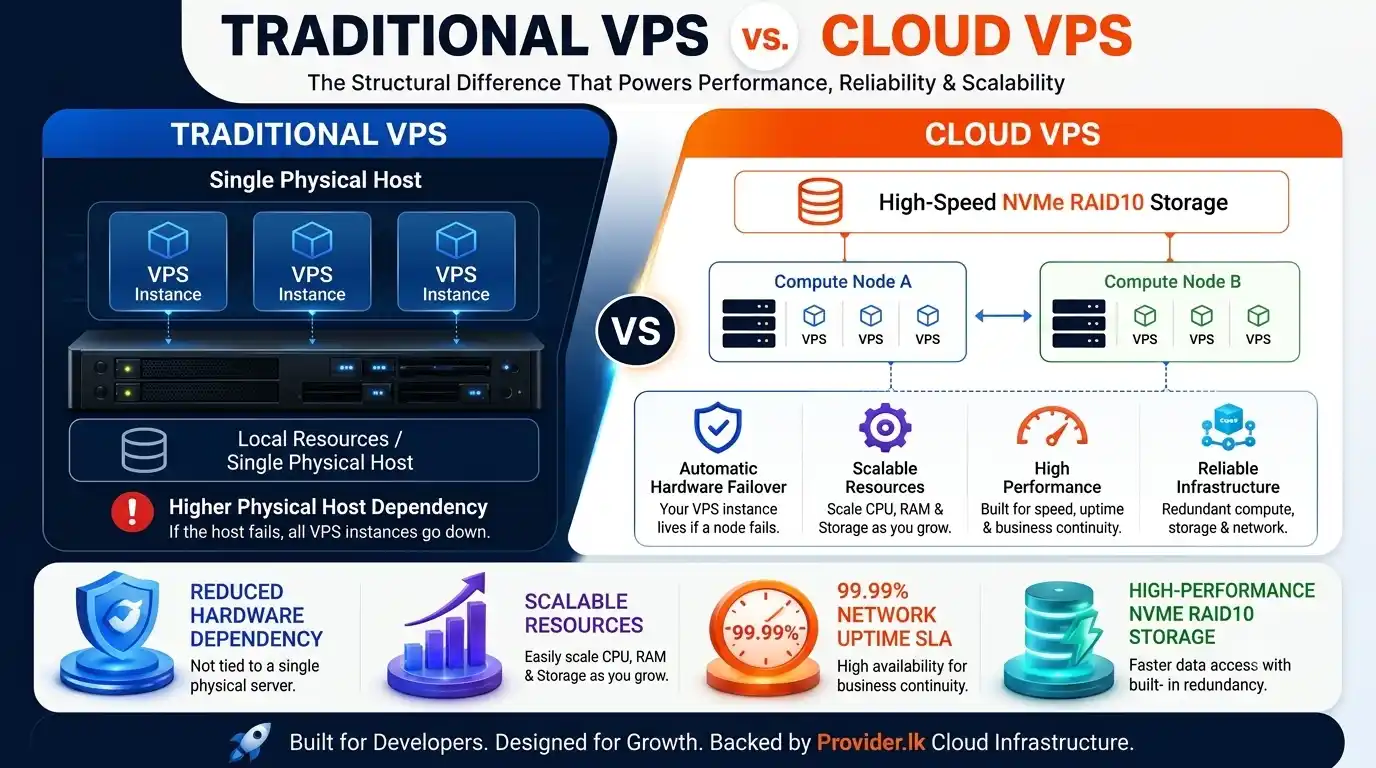
A Traditional VPS works like renting a private apartment in a single physical building. One computer is split into private sections, giving you your own dedicated share of RAM, CPU, and storage. While it offers far better speed and control than basic shared hosting, it is completely tied to that single physical machine, if the hardware breaks, your server goes down with it. It is best for simple, steady websites with predictable traffic.
What is a Cloud VPS?
A Cloud VPS is powered by a team of interconnected computers working together instead of just one. It pulls processing power from a pool of servers and stores your files across a separate, high-speed storage network. Because your site isn’t tied to a single physical machine, it is exceptionally reliable, if one server in the system fails, another instantly takes over so your site stays online. It is ideal for growing websites that need maximum uptime and flexibility.
Traditional VPS vs. Cloud VPS: The Structural Difference
Understanding how the two types of VPS are built helps explain why they can differ in performance, reliability, and how easily they can grow with your needs. The important point is that Cloud VPS is not simply “a faster VPS.” The major difference is the infrastructure architecture supporting the virtual machine.
Here is how that architectural difference translates into practical benefits.
1. Instant Scalability: Upgrades Without the Friction
On traditional VPS hosting, upgrading your server can be difficult when the physical server runs out of available RAM or CPU. In some cases, your VPS may need to be moved to a larger server, which can require additional setup or maintenance.
Key Scalability Advantages:
- Vertical Scaling on Demand: Need to scale from 2 vCPUs and 4GB RAM to 8 vCPUs and 16GB RAM for a seasonal product launch or unexpected traffic surge? Cloud environments allow resource allocation with minimal downtime (or simple hot-add reboots).
- No Hardware Ceilings: You are never bottlenecked by the physical limits of a single host node. Storage and memory can expand seamlessly as your database or application state expands.
- Cost Efficiency for Growth: You do not need to over-provision resources “just in case.” You can start lean and scale up instantly as traffic demands grow, keeping your infrastructure spend aligned with actual usage.
Tip:
Don't wait until your server is consistently running out of resources before planning an upgrade. Monitoring CPU, RAM, storage, and disk activity allows you to identify growth trends and increase capacity before performance becomes a problem.
With Provider.lk Cloud VPS, you can easily upgrade to a higher plan as your resource requirements grow. Upgrades are performed in place, so there’s no need to migrate your VPS to another server. This means you can upgrade with little to no downtime, allowing you to start with a smaller Cloud VPS plan and move to a higher plan whenever you need more resources.
2. High Availability, Maximum Uptime, and Hardware Redundancy
Hardware can eventually fail. Power supplies can stop working, RAM can develop problems, and network connections can fail.
With traditional VPS hosting, a hardware failure on the physical server can cause significant downtime while the issue is fixed or the VPS is moved to another server.
Cloud VPS hosting is designed to provide High Availability (HA) by using multiple servers and built-in redundancy, helping keep your application running even when hardware problems occur.
| Feature | Traditional VPS | Cloud VPS |
| Node Failure Impact | Complete server downtime until hardware is fixed. | Automated Live Migration / Failover: Instance automatically boots on a healthy node in seconds. |
| Storage Architecture | Local Storage: Data is stored on drives within a single physical server. | Distributed Storage: Data is copied across multiple servers or storage systems, helping protect it if one fails. |
| Network Redundancy | Depends on the network connection of the physical server. If it has a network issue, your VPS may be affected. | Uses multiple network paths, so traffic can be automatically redirected if one path has a problem. |
| Maintenance Impact | Server maintenance may require downtime for your VPS. | Maintenance can often be handled in the background with little or no impact on your VPS. |
For businesses that rely on their websites and applications to stay online, such as eCommerce stores, ERP systems, and high-traffic APIs, this added redundancy can help prevent costly downtime.
At Provider.lk, our Cloud VPS infrastructure uses a distributed cluster of servers. If a hardware node fails, the VPS can be moved to a healthy node, helping maintain service availability rather than leaving the virtual machine permanently tied to one physical server.
Tip:
Choose a VPS with automated failover and redundant infrastructure to minimize downtime.
3. Advanced Reliability: Snapshots and Storage Backups
Data protection and disaster recovery are important for any business that depends on its website or applications. With traditional VPS hosting, backups are often handled through tools such as cPanel or DirectAdmin, or through manual file backups. These processes can use server resources and may affect performance while the backup is running.
Cloud VPS hosting can provide additional storage and backup features that make it easier to protect your data and recover quickly if something goes wrong:
- Quick Snapshots: Cloud VPS platforms allow you to take a snapshot of your server before major updates or deployments. If something goes wrong, you can quickly restore the server to its previous state.
- Off-Server Backups: Backups can be stored separately from the server running your VPS. This helps protect your data even if the main server experiences a serious hardware failure.
- Fast NVMe Storage: Cloud VPS platforms can use fast NVMe storage to handle backup tasks efficiently, helping reduce the impact on your website or database while backups are running.
Tip:
Keep independent backups of important data. Snapshots alone should not be your only backup.
How Provider.lk Empowers Your Cloud VPS Strategy
For developers, startups, local e-Commerce brands, and growing IT teams, Provider.lk delivers high-performance Cloud VPS infrastructure designed to strip away setup complexity without sacrificing speed, security, or control.
The goal behind Provider.lk’s Cloud VPS hosting is straightforward: Sri Lankan businesses need enterprise-grade server power that is simple to launch on day one, fully localized for fast response times, and effortlessly scalable as digital workloads grow. Instead of forcing your application into restrictive traditional hosting, Provider.lk provides self-healing virtual infrastructure backed by ultra-low regional latency, full root/administrator access, and transparent localized pricing.
Provider.lk Cloud VPS hosting supports demanding production stacks with high-speed NVMe SSD storage in RAID-10 arrays, dedicated vCPU compute, generous bandwidth allocations, a dedicated IPv4 address, and complete Linux or Windows OS freedom.
This makes Provider.lk an ideal choice when your cloud migration strategy requires:
- ~37ms Ultra-Low Latency: Optimized for Sri Lankan visitors on networks like SLT-Mobitel and Dialog, keeping Time to First Byte (TTFB) fast and responsive.
- Self-Healing High Availability (99.99% Uptime SLA): Automated failover that shifts your virtual server to a healthy node in real time if underlying hardware develops a fault.
- Predictable LKR Pricing: Transparent monthly packages without the unpredictable bandwidth charges or surprise billing common with global hyperscalers.
- Instant In-Place Upgrades: Scale CPU cores, RAM, and storage seamlessly as traffic grows, no server rebuilds or complex data migrations required.
- Enterprise-Grade NVMe RAID-10 Storage: Lightning-fast disk read/write throughput for resource-heavy MySQL/MariaDB databases, POS systems, and API backends.
- Complete System Autonomy: Full root/admin access with your choice of OS (Ubuntu, AlmaLinux, Debian, CentOS, or Windows Server) and optional control panels like cPanel or CloudPanel.
- Unmanaged Freedom or Managed Peace of Mind: Run unmanaged for maximum technical freedom, or add Managed Support so local engineering teams handle monitoring, updates, and server security for you.
Provider.lk does not offer a “one-size-fits-all” server setup. The platform is designed to make enterprise cloud infrastructure approachable to start, transparent to manage, and built to scale alongside your business.
Common Mistakes When Comparing Cloud VPS and Traditional VPS
1. Focusing Only on the Lowest Price
Choosing a VPS based only on the lowest price can be risky for websites and applications that generate revenue. A cheaper plan may not provide the performance or reliability your business needs. Consider the overall value and the potential cost of downtime, not just the monthly price.
Think of an online store during a busy sale: saving a few thousand rupees on hosting may not be worth it if the website becomes slow or unavailable when customers are trying to place orders.
2. Overlooking Storage Speed
Storage speed can affect how quickly your website, database, and applications respond. Choosing a VPS with slow or outdated storage can limit performance even if you have enough CPU and RAM.
3. Ignoring Bandwidth Limits
Some VPS plans come with limited bandwidth or additional charges when you exceed your allowance. Check the included bandwidth and any extra charges before choosing a plan, especially if your website expects high or unpredictable traffic.
Consider a product suddenly going viral on social media: thousands of new visitors can arrive within a short time, quickly increasing your bandwidth usage and potentially affecting your website.
4. Choosing a VPS Based Only on Today’s Needs
Your hosting needs may grow as your website or business grows. Choosing a VPS based only on your current requirements can make it difficult to handle more traffic, add resources, or run additional services later. Look for a solution that can scale with your needs.
A startup might begin with a small website and a few users: as the business grows, it may need more RAM, CPU, storage, or additional applications. A VPS that can scale makes it easier to handle that growth without having to move to a completely different setup.
Choosing the Right VPS Model for Your Business
Ultimately, selecting the ideal hosting architecture comes down to how much your workload needs to scale over time:
- Traditional VPS hosting remains a viable option for low-traffic blogs, personal test servers, or predictable, non-critical applications where static hardware limits aren’t a concern.
- Cloud VPS is the superior choice for dynamic e-Commerce platforms, SaaS backends, corporate databases, and growing web applications that demand ultra-fast NVMe storage, seamless in-place scaling, automated high availability, and predictable monthly bandwidth.
If you are still mapping out your server strategy, check out our comprehensive How to Choose the Right VPS Hosting Plan in Sri Lanka: Buyer’s Guide for a deeper dive into resource planning, vCPU selection, and operating system choices.
Ready to Upgrade Your Hosting Infrastructure?
Don’t let hardware limitations, unexpected server crashes, or sluggish disk speeds hold back your application’s potential.
Deploy your high-performance Cloud VPS on Provider.lk in just a few clicks! Enjoy total root control, instant resource scaling, and self-healing cloud reliability designed specifically for growing businesses.
👉 Deploy Your Cloud VPS with Provider.lk Today