
A Virtual Private Server (VPS) gives your website dedicated resources whenever it outgrows shared hosting. It’s time to upgrade if you’re seeing slow load times, handling traffic spikes during peak periods (like Avurudu sale), or a need for enhanced security, customization, and control tailored to your web application.
With VPS Hosting, you benefit from lower latency for users on networks like Dialog and SLT-Mobitel, along with greater control, stability, and performance. Therefore, a VPS is a strong choice for professional e-Commerce platforms, and corporate websites.
Why Your Sri Lankan Website Needs a VPS (and When to Upgrade)
Most Sri Lankan entrepreneurs start with shared hosting because it is the most budget-friendly entry point. However, as your brand gains traction, you eventually hit what we call the “Shared Hosting Ceiling”.
There are several reasons to upgrade to a VPS, but choosing the wrong combination can either:
- Make you pay for resources you don’t actually need
- Slow down your website
- Cause downtime during traffic spikes
We outline the key reasons to upgrade to a VPS below, so you can make an informed decision.
Identifying the “Shared Hosting Ceiling” for local growth
Think of shared hosting like living in a large apartment complex where everyone shares the same water tank. If your neighbors throw a party and use all the water, your shower turns into a trickle. On a VPS, you have your own dedicated “tank” – your RAM and CPU cores belong strictly to you.
The Performance Edge for Local Users
In Sri Lanka, website speed is a competitive advantage. If a page takes more than three seconds to load on a 4G Dialog or SLT-Mobitel connection, your bounce rate will be increased. While shared hosting is fine for basic blogs, a VPS allows for advanced server-side optimizations like Redis or Memcached that drastically reduce database load.
By leveraging a VPS with high-speed peering, specifically through Singapore-based VPS Hosting optimized for Sri Lanka, you ensure that the latency for your Sri Lankan customers is as low as possible.
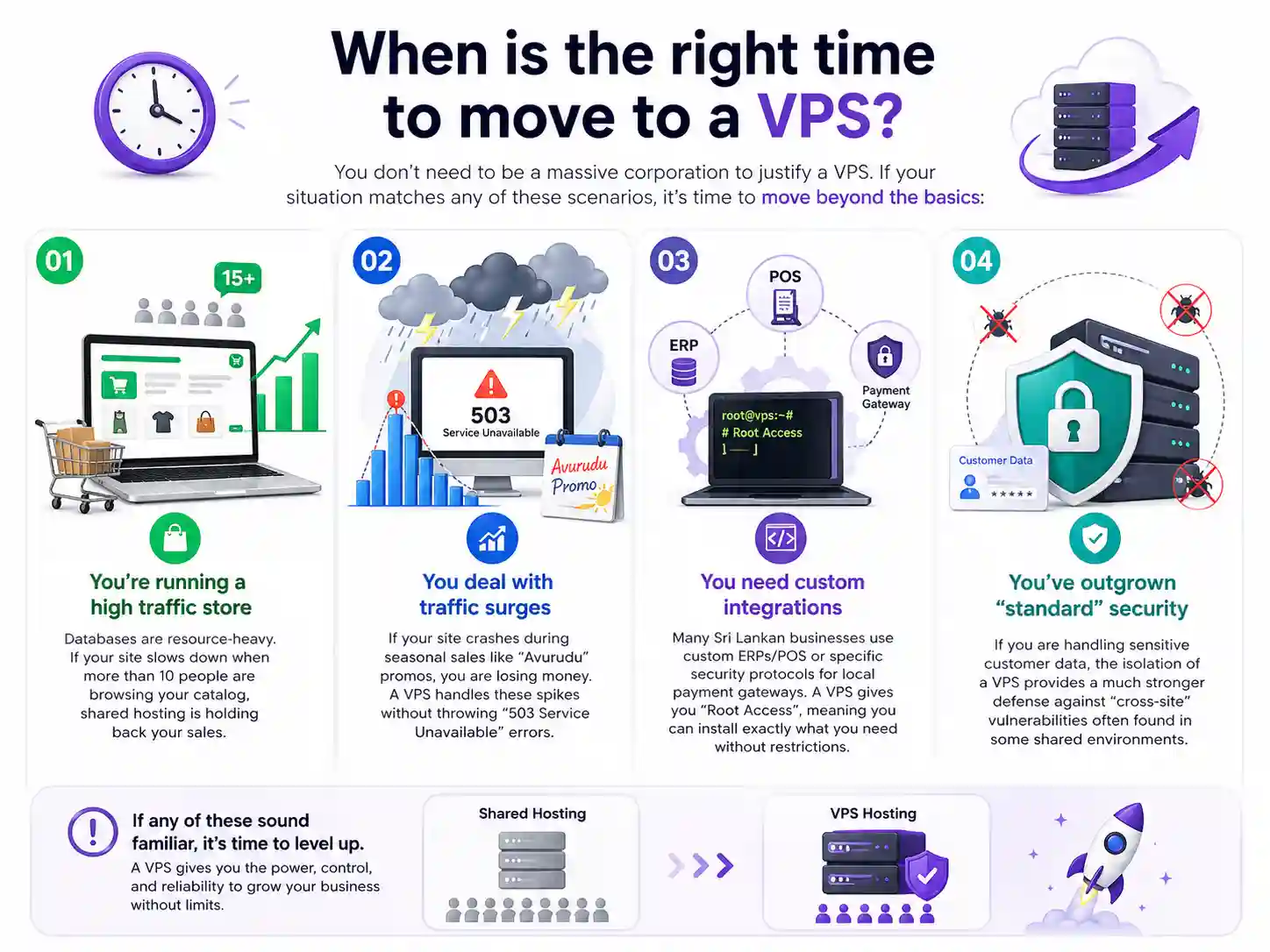
When is the right time to move?
You don’t need to be a massive corporation to justify a VPS. If your situation matches any of these scenarios, it’s time to move beyond the basics:
- You’re running a high traffic store: Databases are resource-heavy. If your site slows down when more than 10 people are browsing your catalog, shared hosting is holding back your sales.
- You deal with traffic surges: If your site crashes during seasonal sales like “Avurudu” promos, you are losing money. A VPS handles these spikes without throwing “503 Service Unavailable” errors.
- You need custom integrations: Many Sri Lankan businesses use custom ERPs/POS or specific security protocols for local payment gateways. A VPS gives you “Root Access”, meaning you can install exactly what you need without restrictions.
- You’ve outgrown “standard” security: If you are handling sensitive customer data, the isolation of a VPS provides a much stronger defense against “cross-site” vulnerabilities often found in some shared environments.
Tip:
Instead of waiting for a "503 Service Unavailable" error, a professional benchmark is to monitor consistent resource usage. If your website’s CPU or RAM usage consistently exceeds 70% utilization, even during non-peak hours, it is time to migrate.
Understanding Technical Specs: RAM, CPU, and Storage Decoded
When you browse VPS plans in Sri Lanka, you’re often met with a wall of numbers: 2GB RAM, 2 vCPU, 50GB NVMe. These aren’t just specs, they are the limits of how many customers your site can handle at once. Let’s break down what these actually mean for your performance.
How Much RAM Does Your Application Actually Need?
RAM (Random Access Memory) determines how many things your server can handle at the same time. RAM doesn’t limit how many people visit your site per day, it determines how many can use it at the same time without slowing down. The more dynamic and feature-rich your application is, the more RAM each visitor consumes.
| VPS RAM | Best Fit in Sri Lanka | Real-World Use Case |
|---|---|---|
| 1 GB | Entry-level / personal sites | Small brochure websites, portfolios, basic landing pages for local businesses (restaurant or a small HRM) |
| 2 GB | Small Sri Lankan businesses | Small WordPress sites, service-based businesses (tuition classes, LMS, POS system), early-stage startup websites |
| 4 GB | Sweet spot for most Sri Lankan SMEs | Mid-sized e-Commerce stores, booking systems, real estate listings, and business websites running with regular traffic |
| 8 GB | Growing or high-traffic businesses | Established e-Commerce brands, online marketplaces, ticketing systems, or platforms handling peak traffic during Avurudu, Black Friday-style promotions, or heavy ad campaigns |
| 16 GB+ | Enterprise / high-scale platforms | Large-scale SaaS products, banking/fintech systems, nationwide services, or apps with constant concurrent users across the world |
The Control Panel Factor: If you use a control panel like cPanel or DirectAdmin to manage your hosting, keep in mind that the panel itself requires about 1GB to 1.5GB of RAM just to stay “awake.”
Tip:
For most Sri Lankan SMEs, 4 GB RAM is the practical starting point for a VPS, offering the right balance of performance, cost-efficiency, and stability for real-world traffic conditions.
CPU Cores: The Engine Behind Your Website’s Speed
While RAM handles the memory, the CPU (Central Processing Unit) handles the “thinking.” Every time a user clicks a link, runs a search, or processes a payment through LankaQR, the CPU executes those instructions.
- Single-Core vs. Multi-Core: Think of CPU cores like lanes on a highway. A single-core VPS is a one-lane road. If one heavy process (like a backup) is running, everything else has to wait.
- For Sri Lankan Startups: We recommend at least 2 vCPU cores for any business-critical site. This allows the server to multitask (processing a customer’s order on one core while generating a PDF invoice on the other).
Operating System: The Foundation
Your VPS needs an operating system to run applications, manage resources, and handle incoming traffic. The two primary choices are Linux and Windows. The right option depends on your application, budget, and technical requirements;
- Linux (Ubuntu, AlmaLinux, Debian): Free, faster, and more secure. Ideal for WordPress, PHP, Node.js, Python. Most beginners should start here.
- Windows Server: Needed only for ASP.NET or MSSQL applications. More expensive due to licensing.
Tip:
Many small businesses in Sri Lanka overpay for Windows VPS hosting unnecessarily. Linux is sufficient for most use cases. Choose Windows if your application specifically depends on Microsoft technologies or requires a familiar desktop-like environment.
SSD vs. NVMe: Why Storage Speed Matters for Local Latency
Most modern providers have moved away from old HDDs, but there is now a massive difference between standard SSDs and NVMe SSDs (Non-Volatile Memory express).
- Speed Gap: NVMe drives are up to 5x to 10x faster than traditional SATA SSDs.
- Why it matters for you: In Sri Lanka, where network latency can fluctuate, you want your server to process data as fast as humanly possible to compensate. If your database (where your prices, stock levels, and user accounts live) is on NVMe storage, your site will feel “snappy” even on a standard 4G connection.
- KVM Virtualization: Always look for VPS plans that use KVM (Kernel-based Virtual Machine). Unlike older virtualization methods, KVM ensures that the SSD/NVMe speed and RAM you pay for are 100% dedicated to you and cannot be “borrowed” by other users on the same hardware.
Tip:
All VPS packages offered by Provider.lk are built on KVM virtualization with high-speed NVMe SSD storage, ensuring your resources are fully dedicated to your server for consistent performance, speed, and reliability.
Managed vs. Unmanaged VPS: Which Path Should You Take?
The choice between a managed and unmanaged VPS is a classic “Time vs. Technical Skill” tradeoff. Managed VPS hosting means your provider’s experts handle the heavy lifting including server updates, security patches, and proactive monitoring. Unmanaged VPS gives you a clean slate to build upon yourself.
The Technical Reality of Unmanaged VPS
If you choose an unmanaged path, you are the server administrator. This is ideal for local developers or tech-heavy startups who want to configure their own tech stack or install custom software without restrictions.
- You handle: OS installation, security hardening, firewall configuration, and regular backups.
- The Benefit: It is often the most cost-effective way to get high-performance hardware.
- The Risk: Misconfiguration can lead to performance issues or security vulnerabilities.
Why Managed VPS is the Choice for Business Growth
For most local business owners, your time is better spent on marketing and sales than on checking server logs. Managed hosting is like having an outsourced IT department.
- The “Hassle-Free” Factor: Your provider handles the technical maintenance, ensuring the server stays secure and optimized for speed.
- Security & Uptime: Managed plans often include proactive security audits and automated updates to protect against local and global threats.
| Feature | Unmanaged VPS | Managed VPS |
| Setup | Manual (Command Line) | Instant / Pre-configured |
| Security | Self-managed | Included (WAF, Patching) |
| Updates | User-managed | Automatic |
| Technical Skill | High | Minimal |
| Cost | Lower | Premium |
Tip:
If you are using WordPress, our Managed WordPress Hosting is the ultimate managed experience without having to purchase a VPS, specifically tuned for WooCommerce success in Sri Lanka.
The Location Factor: Why Singapore is the Gold Standard for Sri Lankan Users
Singapore is the optimal server location for Sri Lankan websites, offering ultra-low average latency 37ms compared to 250ms+ from the US-based servers. This “gold standard” ensures faster Time to First Byte (TTFB), better Core Web Vitals for SEO, and a snappier experience for local visitors. Hosting in Singapore mimics a local hosting environment without the infrastructure limitations of keeping servers physically within Sri Lanka.
The Science of “Ping” and Latency
When a customer in Colombo clicks on your website, a request travels through the fiber optic cables to your server and back. This round-trip time is known as latency or “ping.”
If your VPS is in the United States, that data has to travel halfway around the world. It creates a noticeable “lag” where the page feels sticky. In contrast, Singapore is directly connected to Sri Lanka via major submarine cable systems (like SEA-ME-WE). This direct path reduces the “ping” to as low as 37 milliseconds, roughly 6 to 8 times faster than US-based hosting offered by the other VPS providers in Sri Lanka.
Why Dialog and SLT Fiber Users Benefit Most
Sri Lanka’s internet backbone is heavily optimized for regional traffic. Whether your users are on a Dialog 4G/5G connection or SLT-Mobitel Fiber, their data packets are routed through Singapore-based internet hubs.
- Near-Local Performance: By hosting your VPS in Singapore, you are essentially placing your website right at the gateway where Sri Lankan internet traffic exits the country.
- Mobile-First Speed: Most locals browse on mobile. High latency is felt even more on mobile networks. A Singapore VPS keeps your site responsive even when the user has a fluctuating 4G signal.
- SEO Advantage: Google’s “Core Web Vitals” prioritize page speed. A faster server response time (TTFB) directly contributes to higher rankings in local search results.
Better Performance without the “Local” Risk
While you might think hosting inside Sri Lanka is better, Singapore offers a crucial advantage: World-class infrastructure. Singapore is a Tier III data center hub with superior power redundancy, advanced DDoS protection, and 99.9% uptime guarantees that are difficult to match locally.
By choosing a VPS with Singapore peering offered by Provider.lk, you get the best of both worlds – the speed of a local site and the reliability of a global tech hub. For a detailed breakdown of real-world performance and latency, see our blog post: How Fast Will My Website Load for Sri Lankan Users?
Local vs. International VPS: Payments, Support, and LKR Stability
When choosing a VPS, many local businesses are tempted by large international providers. However, localizing your hosting choice offers significant financial and operational advantages that directly impact your bottom line and peace of mind.
The Shield Against Currency Fluctuations (LKR vs. USD)
If you pay for your hosting in US Dollars (USD), your monthly business expenses are at the mercy of the exchange rate. A sudden dip in the Sri Lankan Rupee can turn an affordable VPS into a significant overhead overnight.
- Fixed LKR Pricing: By choosing a local provider like Provider.lk, you pay in Sri Lankan Rupees (LKR). This allows for predictable budgeting.
- No Credit Card? No Problem: Local providers allow you to pay via Bank Transfer, LankaQR, or mobile wallets like FriMi, making the service accessible to everyone.
Support That Speaks Your Language (and Lives in Your Timezone)
There is nothing more frustrating than having a server issue at 10:00AM in Colombo and having to wait for a US-based support team to wake up.
- Timezone Alignment: Local support means help is available during your business hours.
- Contextual Help: When you say, “My site is slow on Dialog 4G,” a local provider knows exactly what that means and can check the specific peering routes between our Singapore nodes and the local ISP.
Tip:
While the hardware might be in Singapore for performance, having your billing and support in Sri Lanka provides a layer of stability and convenience that international providers simply cannot offer.
Security & Backups: Non-Negotiables for Local Startups
A security breach of your website isn’t just a technical glitch – it’s a reputation killer. Whether you are handling customer data for a delivery app or processing payments, your VPS must be a fortress. Sri Lanka’s Personal Data Protection Act (PDPA) No. 9 of 2022 is the main framework governing how data is stored and protected in Sri Lanka. Under PDPA principles, organizations must ensure personal data is:
- Protected with appropriate technical and organizational measures
- Secure against loss, destruction, or unauthorized access
- Kept accurate and available when needed
DDoS Protection in the Local Context
Distributed Denial of Service (DDoS) attacks are increasingly common in the region, often targeting growing e-Commerce sites to knock them offline during high-traffic sales.
- Why it matters: A DDoS attack doesn’t just slow your site, it can exhaust your VPS bandwidth. It leads to unexpected costs.
- The Provider.lk Advantage: Our VPS plans include built-in DDoS protection at the network level in Singapore, ensuring that malicious traffic is scrubbed before it ever reaches your server.
The “3-2-1” Backup Rule for Peace of Mind
Data loss can happen due to human error, a failed update, or a cyber-attack. For a Sri Lankan business, losing your database means losing your customer history and pending orders. We recommend the 3-2-1 Strategy:
- 3 Copies of Data: Keep your live site and two backups.
- 2 Different Media: Store backups on different storage systems.
- 1 Off-site Location: Keep one backup entirely outside your main VPS.
Tip:
Don't just "schedule" backups, test them. Once a month, try restoring your site to a staging environment to ensure your backup files actually work.
Checklist: 6 Questions to Ask Before You Click “Buy”
Before you commit to a VPS hosting plan for your Sri Lankan business, use this quick checklist to ensure you are getting real value and not just a glorified shared hosting account:
- Does the hosting provider actually own the server? This is a critical industry secret. Most Sri Lankan VPS hosting providers do not own or manage the physical servers. Instead, they resell VPS instances from a third-party provider. This means if an issue occurs, they have to wait for the upstream provider to fix it. At Provider.lk, we directly own and manage our physical servers and the virtualization layer. This gives us absolute control over performance, security, and hardware optimization, ensuring we can resolve issues instantly without waiting on a middleman.
- Is the storage true NVMe? Standard SSD is good, but NVMe is essential for high-performance.
- Is it KVM Virtualized? This guarantees that the RAM and CPU cores you are paying for are 100% dedicated to you and cannot be oversold by the provider.
- Where is the server physically located? If your target audience is in Sri Lanka, insist on Singapore-based servers. US or European servers will introduce unwanted latency.
- Can I pay in LKR? Protect your business from USD currency fluctuations. Ensure the provider accepts local payment methods like bank transfers or LankaQR.
- Do I have the skills to manage it? If you don’t have a system admin, choose a Managed VPS. It costs slightly more but saves you hours of troubleshooting and security patching.
Conclusion: Ready to Scale?
Moving to a VPS is a major milestone for any business. It means your website is growing, your traffic is increasing, and your brand is becoming a recognized name in Sri Lanka. Don’t let a hosting provider put a ceiling on your success.
Ready to get started? Explore our Sri Lanka’s fastest cloud VPS plans and find the perfect fit for your requirements today.