
A Practical Guide to SSL, HTTPS, and Website Security in Sri Lanka
SSL and HTTPS help protect data and build trust, but complete website security also requires regular updates, strong authentication, secure hosting, malware protection, and reliable backups.

When building an online presence in Sri Lanka, securing your website with HTTPS is fundamental. Imagine a potential customer searching for a service you provide. They click on your website, ready to place an order or fill out a contact form. If their browser displays a security warning, it can create uncertainty and undermine their confidence in your business.
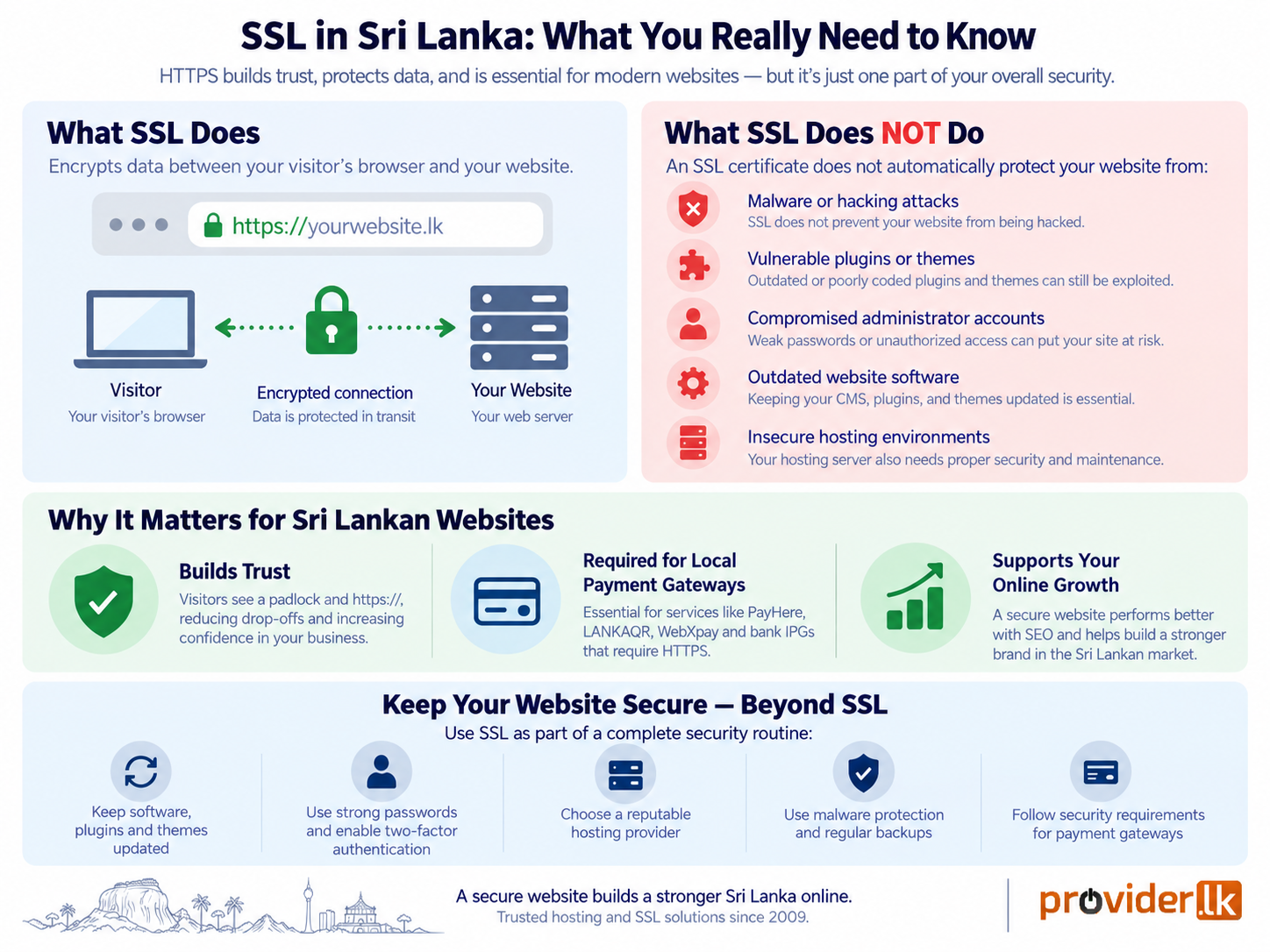
HTTPS has become a standard part of running a modern website. It helps protect information exchanged between visitors and your website. However, a common misconception in Sri Lanka is that HTTPS alone makes a website completely secure. While it protects data as it travels between a visitor’s browser and your website, it does not automatically protect your website from malware, hacking, vulnerable plugins, compromised hosting accounts, or other security threats.
At the centre of HTTPS is the SSL certificate, which helps establish an encrypted connection between a visitor’s browser and your website. But what exactly does an SSL certificate do? Is a free certificate sufficient? Do Sri Lankan websites need certificates issued locally? And does having HTTPS mean your website is completely secure?
In this comprehensive guide, we draw on our experience securing Sri Lankan websites since 2009, when we began offering SSL certificates as one of the early SSL providers in Sri Lanka as a Sectigo (formally Comodo) partner. We will explore how SSL certificates work, the role of HTTPS, the differences between free and paid SSL options, common misconceptions, and what Sri Lankan website owners should know about protecting their website.
What is an SSL Certificate?
SSL stands for Secure Sockets Layer, although modern websites use its successor, Transport Layer Security (TLS). An SSL/TLS certificate helps establish an encrypted connection between a visitor’s web browser and the web server hosting your website.
- Without HTTPS: Information exchanged between a visitor and a website is not protected by HTTPS encryption, making sensitive communications more vulnerable to interception.
- With HTTPS: Data exchanged between the visitor’s browser and your web server is encrypted during transmission, helping protect information such as login details, contact-form submissions, and other sensitive data.
When an SSL certificate is correctly installed, your website uses HTTPS instead of HTTP. Visitors can also see security indicators in their browser showing that the connection is protected.
Tip:
SSL protects more than just payment information. Contact forms, login credentials, passwords, and other information submitted through a website can also contain sensitive data. Using HTTPS helps keep this communication encrypted between the visitor's browser and your web server.
7 Critical Reasons Every Sri Lankan Website Needs an SSL Certificate
1. Protecting Sensitive User Data from Cyber Threats
Sri Lanka has seen a rapid increase in digital adoption, with more consumers browsing, shopping, and interacting online via 4G/5G mobile networks and home fiber broadband. However, higher internet usage also brings increased cyber vulnerabilities, including Man-in-the-Middle attacks and data packet sniffing. An SSL certificate ensures that login credentials, personal details (NIC numbers, addresses), payment info, and form submissions remain completely private.
2. Building Immediate Trust with Visual Security Cues
Trust is the primary driver of online conversions in Sri Lanka. Local online shoppers and service seekers are increasingly aware of digital fraud and phishing scams. When your site is secured, browsers display positive trust signals:
- A closed padlock icon in the address bar.
- An https:// web address instead of http://.
- A smooth, uninterrupted browsing experience without warnings.
3. Essential for Local Payment Gateways (PayHere, LANKAQR, WebXpay)
If you plan to sell products or services online in Sri Lanka, having an SSL certificate is a non-negotiable requirement. Local payment gateways such as PayHere, LANKAQR, WebXpay, and direct bank Internet Payment Gateways (IPGs) like Sampath PayGate or Commercial Bank, enforce strict security compliance before granting API access. They require your checkout environment to operate over HTTPS to satisfy PCI-DSS Compliance requirements.
An SSL certificate helps encrypt data exchanged between your customers and your website. However, SSL alone does not make a payment system PCI DSS compliant; businesses must also meet the requirements of their payment provider and setup.
4. Significant Google Search Ranking & Local SEO Advantage
Search engine optimization is essential for getting discovered by Sri Lankan customers on Google. Google officially considers HTTPS a ranking signal across all domain extensions (.LK, .COM, .ORG). However, when paired with a registered .LK domain for localized geo-targeting, an active SSL certificate gives your site a distinct competitive edge in local search engine results over unsecured HTTP competitors.
5. Safeguarding Your Brand Reputation Against Phishing
While an SSL certificate encrypts traffic between your visitors and your legitimate server, cybercriminals can still create lookalike phishing sites. However, business-validated SSL certificates verify your official corporate registration through a recognized Certificate Authority (CA). This allows customers to verify your legal business identity and ensures bad actors cannot spoof your business credentials.
6. Alignment with Data Privacy Laws (Sri Lanka PDPA)
Data privacy regulation is tightening in Sri Lanka with the implementation of the Personal Data Protection Act(PDPA), overseen by the Data Protection Authority of Sri Lanka. Under modern privacy frameworks, businesses that collect, store, or process personal user data are legally obligated to safeguard that data against unauthorized exposure or breaches.
7. Superior Mobile Performance and Website Speed in Sri Lanka
Over 70% of web traffic in Sri Lanka comes from mobile devices. Modern web optimizations like HTTP/2 supported by almost all the web hosting service providers dramatically improve website speed in Sri Lanka by allowing multiplexed data transfers, but browsers strictly require an active SSL certificate to enable HTTP/2.
Tip:
HTTPS is an important part of website security, but an SSL certificate does not secure the entire website by itself. Keep your website software, plugins, themes, administrator accounts, and hosting environment properly secured as part of your overall security routine.
Free SSL vs. Paid SSL: Which One Does Your Website Need?
Both free and paid SSL certificates provide strong TLS encryption and enable HTTPS. For most websites, a free SSL certificate such as Let’s Encrypt is more than enough, while paid SSL certificates may be suitable for businesses that need additional validation, warranty coverage, or specific features. At present, there are no general regulatory requirements in Sri Lanka mandating the use of paid SSL certificates or business-validated SSL certificates for websites.
| Feature | Free SSL (Let’s Encrypt) | Paid PositiveSSL / EssentialSSL | Paid InstantSSL | Paid EVSSL |
| Validation Level | Domain Validation (DV) | Domain Validation (DV) | Business Validation (BV) | Extended Validation (EV) |
| Financial Warranty | None | $10,000 Sectigo Warranty | $25,000 Sectigo Warranty | $1,750,000 Sectigo Warranty |
| Encryption | TLS encryption | 2048-bit / 256-bit encryption | 2048-bit / 256-bit encryption | 2048-bit / 256-bit encryption |
| Best Suitable For | Blogs, Portfolios, Small Business Sites | Small Business & Service Websites | Growing Businesses & Online Stores | Large Organizations & Enterprise Websites |
Deep Dive: Free SSL Certificates (Let’s Encrypt)
- How it Works: Let’s Encrypt verifies domain ownership via an automated check and issues a certificate valid for 90 days.
- Automated Renewals: Web hosting providers like Provider.lk integrate Let’s Encrypt directly into their hosting control panels, automatically renewing the certificate before it expires.
- Who Should Use It? Personal blogs, portfolio sites, community portals, startup landing pages, and standard small business websites that do not process high-volume financial payments.
Deep Dive: Paid SSL Certificates (Sectigo DV, BV & EV)
- Domain Validation (DV): Suitable for websites that need a straightforward HTTPS solution with quick domain verification and certificate issuance.
- Business Validation (BV): Includes additional verification of the business behind the website, making it suitable for established businesses that want their organization verified by the certificate authority.
- Extended Validation (EV): Involves more comprehensive verification of the organization and is suited to businesses that require a higher level of organizational validation for their online presence.
Tip:
Don't choose a paid SSL certificate simply because it is more expensive. For many blogs, portfolios, small-business websites, and standard WordPress sites, a properly configured free DV certificate provides strong encryption. Consider a paid SSL when your business requires additional validation, warranty coverage, or specific certificate features for your website.
How to Choose the Right SSL Certificate Provider in Sri Lanka?
Choosing an SSL certificate provider involves more than comparing prices. Website owners should consider certificate trust, compatibility, renewal management, technical support, and the specific requirements of their website.
- Free SSL Certificates: For most websites, a free Let’s Encrypt certificate provides strong encryption and is sufficient for securing websites, blogs, and online stores. Look for hosting providers that include automated installation and renewal.
- Premium SSL Certificates: Businesses with specific validation, warranty, or organizational requirements may consider paid certificates, such as Sectigo’s DV, OV, or Wildcard options. Compare the features and validation requirements rather than assuming that a higher price means stronger encryption.
- Renewal and Management: Choose a provider that offers reliable certificate installation, renewals, and monitoring to help prevent unexpected certificate expiration.
- Technical Support: Responsive technical support can be valuable when troubleshooting certificate errors, mixed content, HTTPS redirects, or compatibility issues.
- Local Expertise: A provider familiar with Sri Lankan businesses,
.lkdomains, and local hosting environments can make SSL installation and troubleshooting easier.
SSL Certificates from Provider.lk
At Provider.lk, we believe web security should be accessible, affordable, and hassle-free for every Sri Lankan business. Since 2009, we have powered thousands of websites across the island with enterprise-grade infrastructure.
- Free SSL Included with Web Hosting Plans: Every Shared Hosting, Linux Basic, Linux Cloud, Windows, Application, and Managed WordPress Hosting plan at Provider.lk comes bundled with FREE, automated Let’s Encrypt SSL certificates.
- Premium Sectigo Paid SSL Certificates: For growing online stores, financial platforms, and corporate clients requiring dedicated warranties and business identity validation, Provider.lk offers affordable DV, Wildcard, OV, and EV SSL Certificates.
- Local, Bilingual Technical Support: Provider.lk provides 24/7 technical support in both Sinhala and English to assist you with certificate installation, redirects, and security configuration.
Tip:
SSL should not be treated as a one-time installation. Make sure your certificate remains valid and renewals are working correctly, especially if your website or DNS configuration changes. An expired certificate can trigger browser security warnings and affect customer access to your website.
Step-by-Step Guide: How to Enable SSL on Your Website
Step 1: Install the SSL Certificate
If you are hosted with Provider.lk, log into your control panel to issue your free SSL certificate:
- cPanel: Navigate to the SSL/TLS Status section and click Run AutoSSL.
- Plesk: Refer to How to Install a Free SSL in Plesk.
- DirectAdmin: Refer to How to Install a Free SSL Certificate in DirectAdmin.
If you purchased a paid Sectigo SSL, you will receive an email stating “Configuration Required” – complete the domain validation email or DNS record check to issue your certificate.
Step 2: Update Your Site URLs & Enforce 301 Redirects
For cPanel and Plesk users: You can often configure HTTPS redirection directly through the hosting control panel, avoiding manual .htaccess changes.
If your website runs on Apache or LiteSpeed, you can add the following rules to your website’s .htaccess file, typically located in the document root (such as public_html):
RewriteEngine On

# Redirect HTTP to HTTPS
RewriteCond %{HTTPS} !=on
RewriteRule ^ https://%{HTTP_HOST}%{REQUEST_URI} [R=301,L]
Step 3: Fix “Mixed Content” Warnings
Mixed content occurs when your website loads over HTTPS, but some images, javascripts, or stylesheets still use http:// URLs. Fix this by updating internal asset URLs to https:// manually or using a WordPress plugin such as Really Simple Security or a database search-and-replace tool.
Step 4: Update External Accounts
- Add the new https://yourdomain.lk property to Google Search Console and submit your updated XML sitemap.
- Update your website URL in Google Analytics, social media profiles, and local directory listings.
Tip:
After enabling SSL, don't assume the setup is complete just because the padlock appears. Test the HTTP and HTTPS versions of your website, confirm that HTTP redirects to HTTPS. A redirection loop can occur when HTTPS redirection is enabled in multiple places, such as your hosting control panel and a WordPress plugin. Enable HTTPS redirection in one place only and disable overlapping redirect rules to avoid conflicts.
Does HTTPS Make Your Website Completely Secure?
Based on our years of experience, a common misconception among website owners in Sri Lanka is that installing an SSL certificate is enough to protect an entire website. While HTTPS is an essential part of modern website security, an SSL certificate protects the connection between a visitor’s browser and your website, not the website itself.
What Should Sri Lankan Website Owners Look Out For?
To keep your website secure, pay attention to the following:
- Website software: Keep WordPress, Joomla, and other CMS platforms updated to address security vulnerabilities.
- Plugins and themes: Use reputable, maintained plugins and themes, and remove outdated or unnecessary ones.
- Administrator accounts: Use strong, unique passwords, enable multi-factor authentication where possible, and limit administrative access.
- Hosting environment: Ensure your hosting provider maintains secure server configurations and keeps essential software updated.
- Website vulnerabilities: Protect against common threats such as SQL injection, cross-site scripting, and unauthorized file uploads.
- Malware and backups: Use appropriate malware protection and maintain reliable, regularly tested backups.
- Payment integrations: If your website accepts online payments, use reputable payment gateways and follow their security requirements.
Tip:
Even if your website does not collect payments or passwords, HTTPS is still important. Visitors expect secure connections when browsing modern websites, and avoiding browser security warnings can help maintain trust and prevent potential customers from leaving your site. Keeping your website software, plugins, themes, administrator accounts, and hosting environment properly secured is equally important.
Conclusion
Ultimately, an SSL certificate is no longer a luxury-it is an absolute necessity for every website in Sri Lanka to protect user privacy, eliminate browser warnings, ensure payment compliance, and improve search rankings. A free Let’s Encrypt SSL is ideal for standard websites and blogs that need simple, automated protection, while a paid SSL is a better fit for businesses and e-commerce stores that require enterprise warranty protection and enhanced customer trust. By understanding your website’s goals and evaluating your security needs, you can choose an SSL solution that matches both your technical requirements and budget.
If you’re looking to secure your website in Sri Lanka, Provider.lk offers free automated SSL certificates bundled with our Sri Lanka Web Hosting Plans as well as Paid SSL Certificates, allowing you to choose the level of security that best fits your business while benefiting from reliable infrastructure and local technical support.