

As websites and online applications grow, many Sri Lankan businesses outgrow shared hosting and start looking for something with more room. A VPS (Virtual Private Server) is the usual next step, because it provides dedicated resources, better performance and far more control.
When you start comparing VPS hosting in Sri Lanka, you will run into two options: managed and unmanaged. Both give you the same virtual server. The difference is who is responsible for keeping it running.
This guide covers what each option includes, what each actually costs in Sri Lankan Rupees, and how to decide which one fits your situation.
What is a VPS?
A VPS is an isolated server environment with its own dedicated CPU, RAM and storage, running on cloud infrastructure. Unlike shared hosting, where hundreds of websites compete for the same resources, a VPS gives you a guaranteed slice that nobody else can consume. If you are still deciding whether a VPS is the right hosting solution for your website, you can also read our guide on How to Choose the Right VPS Hosting Plan in Sri Lanka, where we explain VPS specifications, resource requirements, and factors to consider before choosing a plan.
With full root access you can configure the server, install any software, and tune the environment to your application. This is why VPS hosting is the standard choice for growing Point-Of-Sales (POS) systems, WooCommerce stores, SaaS platforms, membership sites, and any application that has outgrown a shared plan.
That control comes with responsibility. Operating system updates, security hardening, monitoring and backups all have to happen. Whether you do them or your provider does them is exactly what the managed versus unmanaged decision is about.
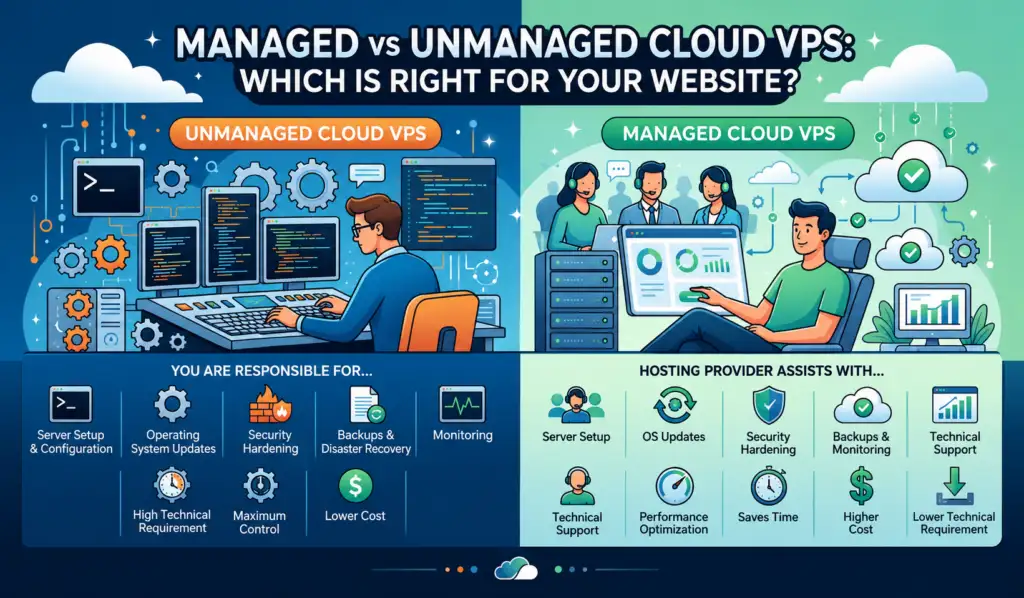
What is an Unmanaged VPS?
An unmanaged VPS (often referred to as self-managed hosting) is essentially raw server infrastructure. The hosting provider’s responsibility ends once they set up the physical hardware, allocate your virtualized slice of resources (CPU, RAM, and SSD storage), and establish network connectivity.
Once your server is provisioned and you receive your root credentials, you are completely in control of your server. This means you are responsible for tasks such as server configuration, security hardening, software updates, firewall management, and monitoring. Guides such as Anyone’s VPS Hardening & Best Practices article cover these types of security measures.
Think of it like leasing an empty commercial building in Colombo. The landlord maintains the structure, the power supply and the water connection. Interior walls, security cameras, and keeping the place clean are entirely your problem.
What your provider still handles
- Physical Server Hardware: Maintaining the underlying bare-metal machines, processors, RAM, and NVMe SSD arrays.
- Network Infrastructure: Routing, switch maintenance, high-speed uplinks, and ensuring the network connection to the server remains active.
- Data Center Power & Security: Ensuring the physical facility has backup generators, cooling systems, and robust physical security.
Advantages of an Unmanaged VPS
- Maximum Cost-Effectiveness: Because you aren’t paying for professional systems administration, unmanaged servers are significantly cheaper.
- Total Customization Control: With full root access, you can install any operating system, run custom script engines, tweak system configurations, and run specialized software without restrictions.
- No Resource Bloat: You only install the services you actually need, ensuring zero system resources are wasted on heavy background software or control panels.
Disadvantages of Unmanaged VPS
- High Technical Requirement: You must be comfortable managing servers using a command-line interface (CLI) via SSH.
- Time-Consuming Management: You are solely responsible for routine operating system patches, firewall configurations, backups, and security hardening.
- Zero Software Support: If a software update breaks your database or a misconfigured firewall blocks your website, your hosting provider cannot log in to troubleshoot the issue.
Tip:
Backups are not a checkbox, they are a schedule you verify. In 2023, a ransomware attack on the Lanka Government Cloud encrypted the systems behind roughly 5,000gov.lkemail accounts. Backups were caught in the same encryption, and no offline copy existed for the period resulting in a permanent data loss. The lesson for anyone running an unmanaged VPS: a backup stored on the same server, or reachable from it, is not a backup. Keep at least one copy offline or on separate infrastructure, and restore from it occasionally to confirm it actually works.
What is a Managed VPS?
A managed VPS shifts the burden of server management, maintenance, and technical troubleshooting to the systems administration team of your hosting provider. You still get the speed and dedicated resources of an isolated VPS environment, but without the administrative headache.
What is normally Included
- Server Setup and Configuration: Your hosting provider prepares the server for use by installing the operating system, configuring essential services, and applying recommended settings. This helps ensure your server is ready to host your applications with minimal setup.
- Operating System Updates: The provider installs operating system updates and security patches to keep your server stable, secure, and protected against known vulnerabilities.
- Security Hardening: Security measures such as firewall configuration, SSH hardening, and other best practices are implemented to help improve your server’s overall security.
- Monitoring and Maintenance: The server is continuously monitored for resource usage, availability, and potential issues, while routine maintenance helps keep it running reliably.
- Backup Management: Many managed VPS plans include scheduled backups and restore assistance to help protect your data in the event of accidental deletion or system failure.
- Software Installation and Configuration: Most providers can assist with installing and configuring common server software such as web servers, databases, PHP versions, SSL certificates, and control panels.
- Performance Optimization: Basic server tuning and optimization may be included to improve resource usage, application performance, and overall server stability.
- Technical Assistance: Managed VPS customers receive assistance with server administration and troubleshooting. Some providers also include script-level or application-level support as part of higher-tier managed plans.
Because managed VPS services vary between providers, always review exactly what is included before making your decision. Compare the management services, support response times, and any limitations to ensure the plan meets your technical requirements.
Tip:
Hardening is not optional in the current threat environment. Sri Lanka CERT recorded more than 12,650 cyber-related complaints during 2025. Among the year's incidents: a March ransomware attack on multiple banks that leaked around 1.9 terabytes of sensitive data including NIC images and transaction histories, and a June compromise of the National Water Supply and Drainage Board's SMS gateway, which was used to send Bitcoin ransom demands from the board's own official shortcode. An unhardened VPS with a default SSH port, password authentication and no firewall will start receiving automated login attempts within minutes of going live. Whether you harden it yourself or pay someone to, it has to happen before the server carries anything you care about.
Advantages of Managed VPS
- Saves Time and Resources: Instead of spending hours running terminal commands or monitoring security logs, you can focus fully on your business, content, or product.
- Professional Security & Optimization: Expert engineers handle your firewalls, apply security updates, and configure optimizations to ensure the fastest possible page load times.
- Disaster Recovery Support: Automated backups and standby administrators mean you have a safety net if a system failure or accidental deletion occurs.
- No Need to Hire Sysadmins: Recruiting an in-house server administrator in Sri Lanka is highly expensive; a managed VPS gives you a team of experts at a fraction of that cost.
Disadvantages of Managed VPS
- Higher Monthly Costs: Because you are paying for technical labor, licenses, and round-the-clock administration, the cost is higher than unmanaged infrastructure.
- Slightly Less Software Freedom: To maintain server stability and honor security guarantees, providers might prevent the installation of highly unstable, experimental, or custom kernel-level software.
Our Approach to Cloud VPS Management at Provider.lk
We have provisioned servers for workloads ranging from university learning management systems to custom financial applications in Sri Lanka, and the requirement rarely comes down to server size. A development team building a bespoke accounting platform wants root access and nobody touching their stack. An institute running an LMS through exam week wants someone watching the server at 2am so they do not have to. Both run identical hardware — what differs is who should be responsible for it.
Rather than offering a fixed support plan, we provide three support options with our VPS Hosting Packages in Sri Lanka, allowing you to choose the level of management that best suits your requirements;
- Unmanaged Support (Default)
This option is ideal for experienced system administrators and developers who prefer complete control over their server environment. Provider.lk maintains the underlying cloud infrastructure, physical hardware, and network, while all operating system administration, security updates, software installation, server optimization, and troubleshooting remain the customer’s responsibility.
- Semi-Managed Support
Semi-Managed Support is designed for customers who want assistance with routine server maintenance while continuing to manage their own applications. This plan includes operating system patching and updates, initial server hardening, automated daily backups, and continuous server monitoring.
- Fully Managed Support
Fully Managed Support is our most comprehensive server management option. It includes everything provided under the Semi-Managed plan, together with assistance from our experienced system administrators for script-level troubleshooting, application and software configuration, custom server environment setup, and advanced server administration. This option is ideal for businesses and individuals who want to focus on growing their applications while leaving day-to-day server management to our experienced system administrators.
Managed vs. Unmanaged VPS: Head-to-Head Comparison
Both options give you the same underlying server: dedicated resources, full root access, and the ability to configure it as you wish. The difference is entirely about who does the work.
| Feature | Unmanaged VPS | Managed VPS |
| Root access | Full root access provided | Full root access provided |
| Server configuration | Managed by the customer | Customer has control, with provider assistance available |
| Operating system updates | Higher chance of getting short Customer responsibility | Supported by hosting provider |
| Security hardening | Customer responsibility | Usually included |
| Server monitoring | Customer responsibility | Usually included |
| Backups | Customer responsibility | Usually included |
| Software installation | Managed by customer | Assistance available depending on support level |
| Troubleshooting | Customer handles server issues | Provider assists with server-related issues |
| Technical knowledge required | Higher | Lower |
What each option actually costs in Sri Lanka
The comparison most articles skip. Using our own pricing as a worked example:
| Setup | Monthly cost |
|---|---|
| vm Large, unmanaged | Rs.3,800 |
| vm Large + Semi-Managed support | Rs.3,800 + management fee of Rs.4,500 |
| vm Large + Fully Managed support | Rs.3,800 + management fee of Rs.10,000 |
| In-house system administrator | Rs.80,000 – Rs.350,000+ |
Two things to weigh beyond the sticker price.
Control panels. CloudPanel Free Edition is included at no cost on our Cloud VMs. A cPanel licence is an addon from Rs.4,900/month. If you are budgeting an unmanaged server, decide early which you need, because cPanel can cost more than the server itself.
Your own time has a price. If maintaining the server takes you four hours a month and your billable rate is meaningful, unmanaged stopped being the cheaper option some time ago. Freelancers and agencies managing several client servers usually discover this around the third or fourth server.
Managed vs Unmanaged VPS: Which One Should You Choose?
There is no single option that is best for everyone. The right choice depends on your technical knowledge, available resources, and how much time you want to spend managing your server.
Choose an Unmanaged VPS If:
An unmanaged VPS may be the right choice if:
- You have experience managing servers
- You are comfortable using SSH and command-line tools
- You have developers or IT staff who can manage the server
- You need complete flexibility over server configuration
- You want to manage your own security, updates, and maintenance
Typical fit: a Colombo web development agency running client sites on its own stack, a developer hosting side projects, a startup with technical founders.
Choose a Managed VPS If:
A managed VPS may be the better option if:
- You do not have server administration experience
- You want assistance with server maintenance
- You run a business-critical website or application
- You prefer spending time on your business rather than server management
- You need technical support for server-related issues
Typical fit: a WooCommerce store heading into an Avurudu or Black Friday sale, a company running its own booking or invoicing system, an organization whose site is its main channel to customers.
The local factor worth weighing
If you go unmanaged with an overseas provider, your server will eventually break outside their working hours, and you will be waiting in a ticket queue in another timezone. Support in Sinhala or Tamil during Sri Lankan business hours is a practical advantage that does not show up in a specification comparison — until the night you need it. Local billing in rupees, rather than dollar charges with Forex exposure on every renewal, is the other difference you feel monthly rather than once.
Common Misconceptions About Managed and Unmanaged VPS
“Managed VPS Is More Powerful Than Unmanaged VPS”
Managed and unmanaged VPS plans can use the same hardware resources, including CPU, RAM, and storage. The difference is not performance but the level of management and support provided.
A managed VPS is not necessarily faster; it simply includes additional assistance.
“Unmanaged VPS Is Only for Large Companies”
While unmanaged VPS solutions are commonly used by experienced developers and IT teams, smaller businesses can also use them if they have the required technical knowledge or someone available to manage the server.
Conclusion
Ultimately, there is no universally “better” option. An unmanaged VPS is ideal for experienced users who want complete control over their server environment, while a managed VPS is a better fit for businesses and individuals who prefer expert assistance with server administration. By understanding the responsibilities of each option and evaluating the level of support offered by your hosting provider, you can choose a VPS solution that matches both your technical expertise and your long-term requirements.
If you’re looking for VPS Hosting in Sri Lanka, Provider.lk offers both unmanaged and managed support options, allowing you to choose the level of server management that best fits your needs while benefiting from reliable cloud infrastructure and local technical support.