

Managing a website involves juggling dozens of technical tasks, from setting up custom business email addresses and configuring MySQL databases to updating SSL security certificates and monitoring disk storage limits. While experienced system administrators navigate hosting control panels effortlessly, new website owners often find traditional server administration confusing and intimidating.
At Provider.lk, our Linux shared hosting packages (except daStarter) and Cloud Hosting packages use the cPanel control panel. Over recent years, cPanel has evolved from a traditional, menu dense administrative interface into a guided environment that incorporates artificial intelligence. These upgrades aim to simplify server management and speed up initial website creation.
Understanding how the new AI features of cPanel work, and how to use them safely alongside reliable hosting infrastructure, can help Sri Lankan entrepreneurs, web professionals, and small businesses build and maintain their online presence.
Let’s look at what these features do, how they may help website owners, and what to consider when using AI to manage a website.
Resolving routine hosting tasks with AI Assistant in cPanel
Provider.lk has been serving web hosting and .LK domain registration customers in Sri Lanka since 2009. Based on the many support tickets we have handled over the years, we have seen that website owners commonly need assistance with everyday hosting tasks, such as creating a professional email inbox (for example, [email protected]), connecting a domain, or finding their FTP login credentials.
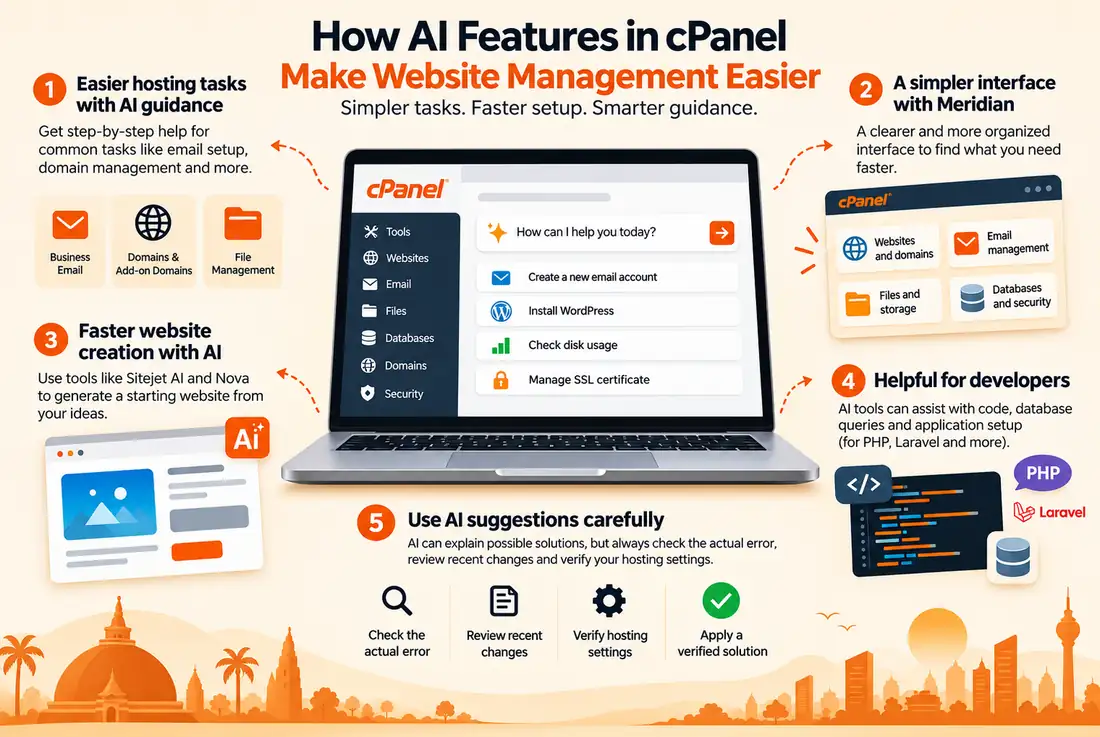
Traditionally, completing these tasks could involve opening a support ticket, navigating multiple menus, or searching through technical documentation. Our initial tests showed that the AI Assistant within cPanel simplifies this experience by providing contextual guidance, helping users troubleshoot common issues, understand available features, and perform supported account-management tasks directly through an interactive chat interface.
Rather than searching for specific icons or navigating technical documentation, account owners can simply ask the AI Assistant questions in natural language and receive contextual guidance to help them manage their hosting accounts and troubleshoot common issues.
Traditional hosting workflow:
- Find the correct option in cPanel.
- Search documentation for instructions.
- Open a support ticket if further help is needed.
- Wait for a response before proceeding.Find the correct option in cPanel.
- Search documentation for instructions.
- Open a support ticket if further help is needed.
AI-assisted hosting workflow:
- Ask a question in plain language.
- Review the suggested guidance.
- Check the relevant hosting settings.
- Complete the task if the required features are supported.
For a local business owner managing an online store or service website, this guidance may make routine account tasks easier to understand. However, more complicated issues can still require technical support.
The Meridian interface and how it simplifies navigation for local business owners
One change intended to make cPanel easier to navigate is the Meridian interface. Rather than displaying dozens of standalone technical icons across a dense layout, Meridian organizes the control panel around common hosting activities.
- Websites and domains: Tools for managing websites and related settings.
- Email management: Options for setting up professional email accounts, autoresponders, and forwarders.
- Files and storage: Tools for managing website files and checking disk space usage.
- Databases and security: Options for managing MySQL databases and SSL certificates.
To review the interface updates, look into the official cPanel Meridian release notes.
Features such as guided setup and improved navigation can help users who are less familiar with hosting terminology find the relevant tools. Availability depends on the interface and features enabled by the hosting provider.
AI features in cPanel for website creation in Sri Lanka
For small businesses and startups in Sri Lanka, bringing a website online can take time, particularly when creating page layouts and preparing content. AI-powered website creation tools aim to simplify the initial design process by generating website structures and starter content from text descriptions.
cPanel’s website creation options include tools such as Sitejet AI and Nova. Their availability and capabilities depend on the provider’s configuration and the specific product being used.
While these tools can speed up the initial design and layout process, local business owners should verify all generated details before publishing. AI website builders may produce generic placeholder text, incorrect contact details, or information that does not match the business.
Before publishing an AI-generated website for a Sri Lankan audience, business owners should review:
- Local business details: Verify addresses, mobile numbers, landlines, and registered business names.
- Payment integration: Confirm that checkout workflows support the payment methods required by the business, such as PayHere or LANKAQR where applicable.
- Currency formatting: Ensure product prices and service fees display correctly in Sri Lankan rupees (LKR).
- Mobile usability: Test the website on mobile devices and connections commonly used by the intended audience.
For a standard business website, Linux hosting with cPanel provides a hosting environment for supported websites, including HTML and PHP-based sites and WordPress installations. For more guidance, read our article on how to create a website in Sri Lanka, including costs, tools, and AI.
Model Context Protocol and AI features in cPanel
Artificial intelligence is also changing how developers work with software and hosting tools. Developers can use AI coding assistants to help understand code, prepare database queries, and troubleshoot applications built with technologies such as PHP and Laravel.
The Model Context Protocol (MCP) is an open standard that allows compatible AI applications to connect with external tools and services. Where a compatible cPanel integration is available and configured, it can provide a way for supported AI clients to interact with hosting tools through authorized access.
The exact capabilities depend on the integration, permissions, and hosting provider’s configuration. MCP support should not be taken to mean that every AI application can automatically access a cPanel account.
Developers can read the official Model Context Protocol documentation.
Although AI coding tools can help with development, the final performance of a web application still depends on its code, database queries, hosting resources, and network conditions. To learn more about website performance for local audiences, read our guide to website speed for Sri Lankan users.
What Sri Lankan website owners should know before relying on AI features in cPanel
While AI features can make hosting tools easier to understand, website owners should not blindly trust AI suggestions or treat them as confirmed solutions. An AI tool may suggest a possible cause based on the information provided, but the correct solution depends on the actual website and hosting environment.
For example, a PHP website may encounter an error after a configuration change. An AI tool might suggest editing the .htaccess file, but a change that works in one environment may cause another error in a different configuration.
Here are some common situations where unverified AI advice can create additional problems.
1. Incorrect .htaccess rules
AI tools may suggest Apache rewrite rules to resolve redirection problems or other website issues. However, the correct rules depend on the website’s configuration and the hosting environment.
Pasting an unsuitable configuration snippet can cause a 500 Internal Server Error or interfere with existing rules. Website owners should check the error logs, keep a copy of the original file, and test proposed changes carefully.
2. Disrupted email routing
When asked to resolve email delivery problems, an AI tool may suggest changing DNS records. However, the correct MX records depend on the email service being used.
Replacing existing records with generic values can interrupt business email delivery. Always verify the required settings with the email provider before changing DNS records.
3. Accidental file or backup deletion
When an account approaches its disk quota, an AI tool may recommend deleting cache files, logs, or other directories. Some files may be safe to remove, while others could contain important website data, uploads, or backups.
Before deleting unfamiliar files, confirm their purpose and check that a usable backup exists.
A lesson from technical troubleshooting
In one hosting support case involving a PHP website, a customer contacted our technical support team after encountering repeated errors. The initial information provided included possible causes and troubleshooting suggestions generated by an AI tool. However, to investigate the issue accurately, our team needed to review the actual error messages and relevant logs, along with details of the changes made to the website before the errors occurred. After gathering this information and examining the hosting environment, the team was able to identify the underlying issue and guide the customer towards a solution.
This highlights an important limitation of AI-assisted troubleshooting: suggestions are only as useful as the information provided. Without actual error details, relevant logs, and a clear understanding of recent changes, AI-generated recommendations may not address the real cause of a problem.
Tip:
Before applying AI-generated code or configuration changes, keep a backup of the original files, check the actual error, and test the proposed solution carefully. If the problem involves unfamiliar server settings, ask your hosting support team to review it before proceeding.
Safety checklist for AI-guided website changes
Before applying AI-generated code, changing database settings, or deleting files:
- Ask for technical help when necessary: If a suggestion involves unfamiliar commands, database changes, or server-level settings, verify it with your hosting technical support team first.
- Keep a backup: Make sure you have a usable backup before changing important website files or configurations.
- Verify DNS and email settings: Do not change MX or CNAME records without checking the exact values supplied by your domain or email provider.
- Review suggested code: Check whether a proposed change is suitable for your website and hosting environment.
Summary and next steps
The introduction of AI features into cPanel aims to make website and hosting management more accessible to users without extensive technical experience. Improved navigation, guided assistance, and AI-powered website creation may help Sri Lankan business owners handle some routine tasks more easily.
However, AI does not remove the need to verify website settings, protect important files, and investigate technical problems carefully. Its suggestions should be treated as guidance rather than unquestionable instructions.
Ready to simplify your web hosting management? Explore Provider.lk’s Linux hosting plans with cPanel and Cloud Hosting plans to find a suitable hosting environment for your website, backed by Sri Lankan technical support.