
Sri Lankan Web Hosting Company and LK Domain Registration Provider
Pointing Your .LK Domain to a Website and Configuring DNS
At a Glance: Pointing and Configuring Your LK Domain
- The Identity Bridge: Pointing your .LK domain is the essential step that maps it to a web service, effectively turning a "label" into a functional destination.
- Flexible Authority: You can choose between delegating full control via Nameservers, or maintaining granular record-level control (A, CNAME, MX) for VPS and PaaS platforms like Vercel or Shopify.
- Global Integration: Despite being a localized national extension, .LK domains are fully compatible with world-class infrastructure.
- The Propagation Window: While registry updates via Provider.lk are instant, global synchronization (propagation) across international and local ISPs typically requires 2 to 24 hours to complete.
Pointing your .LK domain to a functional website is the critical technical bridge between your registered identity and your live digital presence. After register your .LK domain, the DNS configuration serves as the navigational map that directs global traffic to your specific server. Understanding how to managenameservers and individual records ensures that your Sri Lankan business is reachable, secure, and optimized for high-performance resolution.
This guide provides a comprehensive walkthrough for delegating your .LK extension to various infrastructures, from standard shared hosting to advanced platforms like Cloudflare, VPS environments, and modern PaaS providers. We will explore the mechanics of the Domain Name System (DNS), explaining how to manipulate A records, MX records, and CNAMEs to maintain operational continuity. To understand the governance and security protocols that power these connections, return to our core guide on the LK Domain Registry.
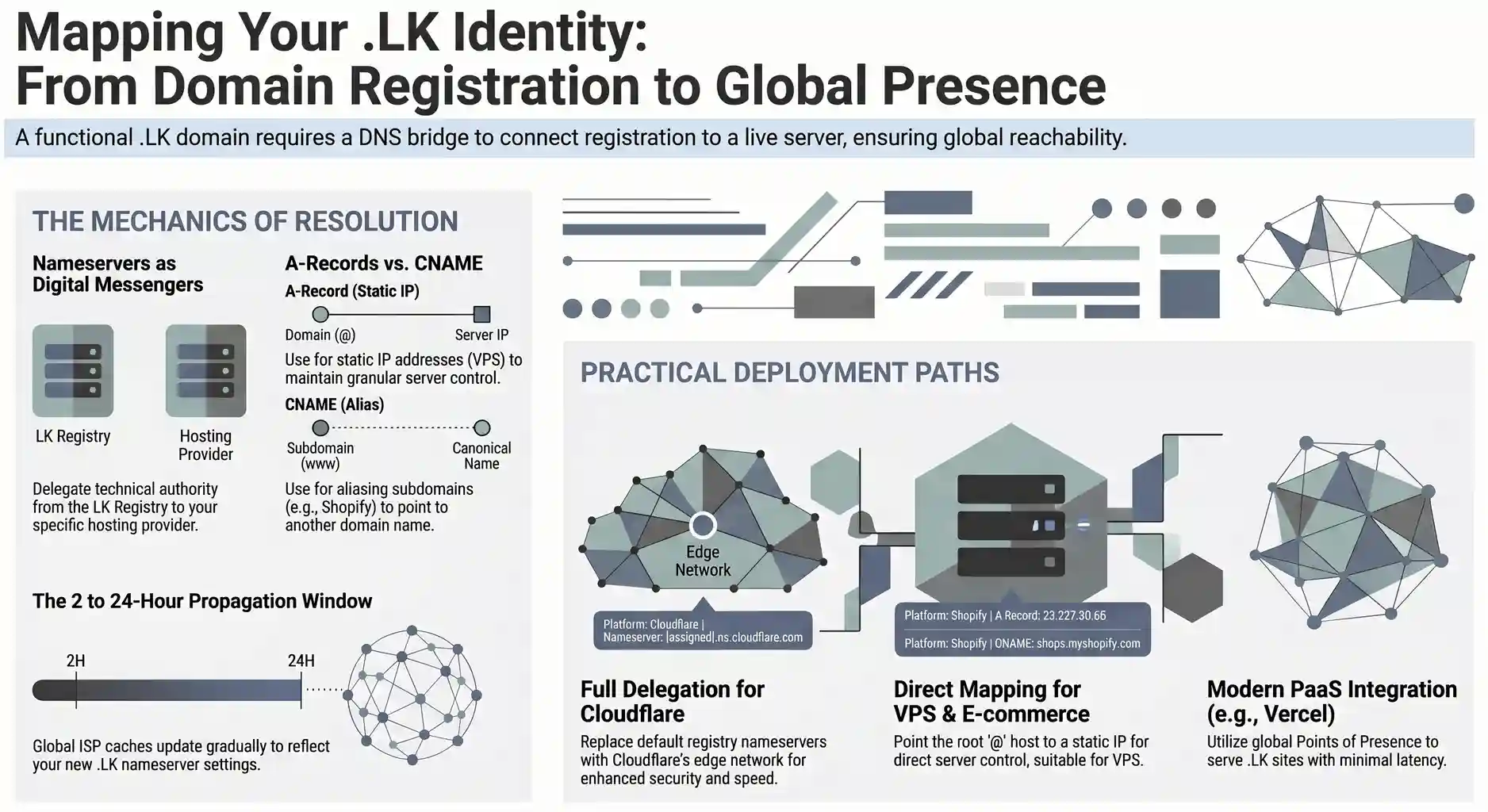
The Link Between Your LK Domain Registration and Website Hosting
A domain name serves as your brand’s digital address, but it requires a DNS pointer to connect to the physical server where your website files reside. In the Sri Lankan digital ecosystem, the LK Domain Registry holds your identity, but the DNS configuration determines your destination. Proper synchronization between your registry record and hosting IP is the foundation of a functional web presence.
Think of your .LK domain as a entry in a telephone directory and your hosting as the physical office building. Registering the name ensures no one else can use your brand, but “pointing” the domain is what actually installs the phone line. When a user enters your URL, the browser queries the DNS Root Zone to find which server is authorized to handle your traffic. By managing this link through Provider.lk, you ensure that your “digital storefront” is correctly mapped to its high-performance hosting environment.
Understanding LK Nameservers and Authority
Nameservers (NS) are the specialized servers that act as the primary messengers for your .LK domain, directing all global traffic to the correct hosting infrastructure. By assigning specific nameserver addresses to your domain, you delegate the technical authority of your domain to a hosting provider. This hierarchy is essential for ensuring 100% resolution reliability.
In the .LK ecosystem, the Registry maintains the top-level pointers, but your host provides the specific “instruction manual” (the Zone File). When you update your nameservers to values like dns1.provider.lk and dns2.provider.lk, you are telling the global internet: “Ask these servers for my website’s location”. This delegation is the most critical step in the setup process. It allows your host to manage complex records—like your website IP and email routing, without needing to manually contact the Registry for every minor change.
How to Point an LK Domain Using Provider.lk
Configuring your .LK DNS settings through the Provider.lk client area is a streamlined process designed to bridge the gap between registry governance and active hosting. By accessing the domain management dashboard, users can manually input authoritative nameservers, ensuring their Sri Lankan business identity resolves correctly across global networks. This step is the final requirement for making your website live.
To point your domain, log in to your Provider.lk Client Area and navigate to the ‘Domains’ section. Select your active .LK domain and locate the Nameservers tab. Here, you will replace the default registry placeholders with the nameservers provided in your hosting welcome email. Once you click “Change Nameservers,” our system sends a secure update request to the LK Domain Registry. This update triggers the global update process, signaling to every DNS server on earth that your brand has a new home.
How to Point Your .LK Domain to Cloudflare
By replacing your default nameservers with Cloudflare’s authoritative ones, you shift the DNS management to their edge network. This setup allows for faster resolution times and advanced traffic filtering, ensuring your Sri Lankan business remains resilient against localized and international web threats.
To begin, add your .LK domain to your Cloudflare dashboard by signing up. Cloudflare will scan your current records and provide two specific nameservers (e.g., ashley.ns.cloudflare.com). You must then log in to the Provider.lk portal and update your domain’s nameservers to match these. Once active, you can manage your SSL, caching, and WAF settings directly through Cloudflare while keeping your domain registration securely managed at home. If you want to avoid the hassle and manage DNS directly through Provider.lk, you can simply select our premium Cloud DNS management when you register your .LK domain, powered by Cloudflare’s industry-leading edge network.
Pointing Your .LK Domain to a VPS via A Record
Connecting an .LK domain to a VPS (Virtual Private Server) typically involves a direct A Record assignment rather than a full nameserver change. By pointing the “Host” record to your VPS’s static IPv4 address, you maintain granular control over your server environment while utilizing the upstream provider’s (like Provider.lk) infrastructure for DNS management. This is the preferred method for developers running custom applications on unmanaged Linux or Windows instances.
Unlike shared hosting, a VPS gives you a dedicated IP. In your Provider.lk DNS manager or CloudFlare, create an A Record with the hostname, @ (representing your root domain) and paste the IP address provided by your VPS provider. You should also create a CNAME or another A record for www. This configuration ensures that when a user types your .LK address, the upstream provider directs them straight to your virtual machine. This setup is highly efficient for low-latency applications, as it skips unnecessary redirection layers.
Connecting .LK Domains to Vercel or Modern PaaS
Deploying a frontend application on Vercel with a .LK extension requires configuring CNAME and A records to align with their global edge network or using Vercel’s nameservers. Vercel’s infrastructure is optimized for frameworks like Next.js, and by pointing your local domain to their platform, you combine Sri Lankan brand identity with their deployment speeds. This ensures your site is served from the closest global POP (Point of Presence).
In the Vercel project settings, add your .LK domain. Vercel will prompt you to set nameservers or add two specific records to your DNS. Enter these values into the nameserver submission form provided through the Provider.lk client area. Alternatively, use the Provider.lk DNS manager if you are using our Cloud DNS service. Vercel will automatically detect the changes once propagation begins and completes the validation for your .LK domain.
Pointing .LK Domains to Shopify or E-commerce Platforms
For businesses using Shopify, pointing an .LK domain involves modifying the A Record and the CNAME record to route traffic through Shopify’s specialized e-commerce servers. This integration allows your Sri Lankan store to benefit from a secure checkout process while maintaining a localized extension that builds trust with domestic shoppers. Proper configuration is key to avoiding “SSL Pending” errors on your storefront.
To link the two, go to your Shopify “Domains” settings and click “Connect existing domain.” You will be instructed to point your A Record to Shopify’s IP address (23.227.38.65) and your www CNAME to shops.myshopify.com. Update these within your Provider.lk DNS manager or CloudFlare. It is important to ensure no other A records exist for the @ host, as multiple records can cause intermittent connection issues. Once saved, Shopify will verify the connection and finalize the setup, making your .LK store ready.
Managing LK DNS Records: A, CNAME, and MX Explained
Beyond nameservers, individual DNS records like A, CNAME, and MX define how different services—such as your website, subdomains, and professional email—function under your .LK domain.
- A Record (Address): The fundamental bridge that maps your domain name to a static IPv4 address. This record tells the internet exactly which physical server is hosting your website’s files.
- AAAA Record (IPv6 Address): Functions identically to the A Record but maps your domain to a 128-bit IPv6 address, ensuring your .LK domain is accessible over the latest internet protocol standards.
- CNAME Record (Canonical Name): Acts as an alias that points one domain or subdomain to another domain name rather than an IP. This is commonly used to point www.yourbrand.lk to the root yourbrand.lk or to link to external services like Shopify or Zendesk.
- MX Record (Mail Exchanger): Specifies the mail servers responsible for receiving email on behalf of your domain. Correct configuration is vital for business email delivery; without it, emails sent to your @brand.lk address will fail to resolve.
- TXT Record (Text): Allows a domain administrator to enter arbitrary text into the DNS. These are frequently used for SPF (Sender Policy Framework) records to prevent email spoofing and for verifying domain ownership with third-party tools like Google Search Console.
- SRV Record (Service): Defines the location (hostname and port number) of specific services, such as VoIP or specialized messaging protocols, allowing traffic to find the right entry point for those applications.
- SOA Record (Start of Authority): Contains essential administrative information about the zone, including the primary nameserver, the email of the domain administrator, and timers for how often secondary servers should refresh their data.
By managing these records through a unified dashboard, you ensure that your web traffic and communication channels remain perfectly synchronized across the global DNS grid. To simplify this technical overhead, Provider.lk offers premium Cloud DNS management for all .LK domains, powered by Cloudflare’s industry-leading edge network.
You can select this add-on during the registration process to eliminate the latency of traditional nameservers and gain access to enterprise-grade security and near-instant propagation, all without leaving your localized management portal.
DNS Propagation and Global Resolution Times of LK Domains
DNS propagation is the period when global ISP caches update to reflect your new .LK nameserver settings. While updates via Provider.lk are instant and require no manual approval, the internet’s distributed nature creates a delay. Consequently, it can take 2 to 24 hours for your website to become globally accessible across all networks.
This delay happens because the internet relies on “caching” to speed up browsing. When a user in another country visits your site, their local ISP saves the DNS result for a set duration, known as TTL (Time to Live). Until that cache expires, they may still see the old server location or a “not found” error. During this window, you can use global DNS checker tools to monitor the progress of your .LK domain as it “propagates” through major nodes in North America, Europe, and Asia.
You can monitor this transition in real time by using tools to verify .LK domain propagation across local ISPs. This allows you to track exactly when your new settings reach major Sri Lankan networks like SLT and Dialog, giving you a clear view of your site’s availability.
Troubleshooting Common Connection Issues
Encountering a DNS resolution error after pointing your .LK domain is often the result of mismatched nameservers or incomplete propagation. Common issues like the NXDOMAIN error indicate that the DNS system cannot find your domain, whereas a connection timeout suggests the domain is pointed correctly but the hosting server is not responding. Systematic troubleshooting through a tool like, lankadomain.com DNS & Mail Heath Checker, ensures your digital identity remains online and accessible.
First, verify that your nameservers are spelled correctly; a single typo in the NS record will break the chain of trust. Second, check your Domain Status; if a domain is “Pending” or “Suspended” due to missing documentation, it will not resolve regardless of your DNS settings. Finally, ensure your hosting server has the domain added to its “Allowed” list. If problems persist, the technical team at Provider.lk can perform a DNS trace to identify exactly where the resolution path is failing, getting your .LK site back on track.
Bridging Your DNS to the .LK Registry Infrastructure
Successfully pointing your .LK domain is the final step in activating your digital identity. While this guide handles the technical configuration of nameservers and DNS records, the stability of your connection relies on the LK Domain Registry’s underlying national infrastructure. As an authorized agent, Provider.lk manages the bridge between your specific server settings and the registry’s root systems, ensuring your brand remains reachable and compliant.